
.svg?v=180920048278408794651776809924)


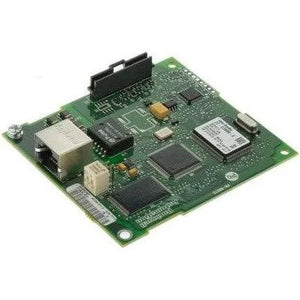

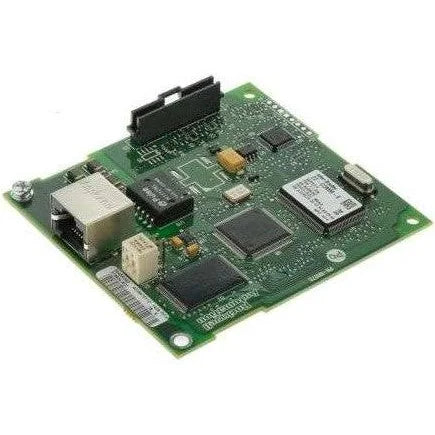
22-COMM-E | Allen-Bradley EtherNet/IP Adapter for PowerFlex 4, 40, 400 Drives
- Regular price
- $305.00
- Sale price
- $305.00
- Regular price
-
Couldn't load pickup availability


Product Description P/N: 22-COMM-E
Description
The Allen-Bradley 22-COMM-E is an EtherNet/IP communication adapter designed for PowerFlex 4, 40, and 400 AC drives. It installs directly into the drive’s communication slot to enable high-speed Ethernet connectivity, allowing seamless integration into modern industrial networks.
Technical Specifications
| Condition | New/Never Used Surplus |
| Brand | Allen-Bradley |
| Manufacturer | Rockwell Automation |
| Part Number | 22-COMM-E |
| Product Type | EtherNet/IP Adapter |
| Compatible Drives | PowerFlex 4, 40, 400 |
| Communication Protocol | EtherNet/IP |
| Communication Port | 1 × RJ45 |
| Data Rates | 10 Mbps (Half/Full), 100 Mbps (Half/Full) |
| TCP Connections | Up to 30 |
| Packet Rate | Up to 400 I/O packets per second |
| Minimum RPI | 5 ms |
| Power Consumption | 350 mA @ 5V DC (from host) |
| DSI Connector | 20-pin |
| Status Indicators | 4 LEDs |
| Operating Temperature | -10 to 50 °C (14 to 122 °F) |
| Storage Temperature | -40 to 85 °C (-40 to 185 °F) |
| Relative Humidity | 5–95% non-condensing |
| Dimensions | 19 × 86 × 78.5 mm (0.75 × 3.39 × 3.09 in.) |
| Regulatory Compliance | UL508C, CSA C22.2, EN50178, EN61800-3 |
| Cabling | RJ-45 CAT compliant cable |
Information About 22-COMM-E
The Allen-Bradley 22-COMM-E is a compact, high-performance EtherNet/IP adapter that expands the communication capabilities of PowerFlex component-class drives. Once installed, it allows drives to communicate over EtherNet/IP at speeds of 10 or 100 Mbps, supporting both full- and half-duplex modes.
Designed for industrial environments, the adapter provides up to 30 simultaneous TCP connections, handles up to 400 total I/O packets per second, and supports a minimum Requested Packet Interval (RPI) of 5 ms, making it ideal for fast-response applications.
The 22-COMM-E includes built-in diagnostic web pages for drive and adapter information, configuration options, and status monitoring. It also supports configurable email notifications for drive fault and communication events. With four onboard status LEDs, technicians can quickly verify network, module, and DSI (Drive Serial Interface) health.
This adapter is fully compatible with standard Ethernet tools such as BOOTP/DHCP utilities and integrates seamlessly with Allen-Bradley PLCs via EtherNet/IP for real-time control and monitoring.
Key Features:
- Provides EtherNet/IP connectivity for PowerFlex 4, 40, and 400 drives
- Supports 10/100 Mbps, full or half duplex
- Up to 400 total I/O packets per second
- Supports 30 TCP/IP connections
- Built-in web pages for diagnostics and configuration
- DSI (20-pin) connector for drive interface
- Email notification capability for fault/clear events
- Four LED indicators for quick diagnostics
- Compact, drive-mounted installation
- BOOTP/DHCP support for IP configuration
A compact EtherNet/IP communication adapter that enhances PowerFlex Component-Class drives with high-speed networking, diagnostics, and flexible configuration capabilities.
Description
The Allen-Bradley 22-COMM-E is an EtherNet/IP communication adapter designed for PowerFlex 4, 40, and 400 AC drives. It installs directly into the drive’s communication slot to enable high-speed Ethernet connectivity, allowing seamless integration into modern industrial networks.
Technical Specifications
| Condition | New/Never Used Surplus |
| Brand | Allen-Bradley |
| Manufacturer | Rockwell Automation |
| Part Number | 22-COMM-E |
| Product Type | EtherNet/IP Adapter |
| Compatible Drives | PowerFlex 4, 40, 400 |
| Communication Protocol | EtherNet/IP |
| Communication Port | 1 × RJ45 |
| Data Rates | 10 Mbps (Half/Full), 100 Mbps (Half/Full) |
| TCP Connections | Up to 30 |
| Packet Rate | Up to 400 I/O packets per second |
| Minimum RPI | 5 ms |
| Power Consumption | 350 mA @ 5V DC (from host) |
| DSI Connector | 20-pin |
| Status Indicators | 4 LEDs |
| Operating Temperature | -10 to 50 °C (14 to 122 °F) |
| Storage Temperature | -40 to 85 °C (-40 to 185 °F) |
| Relative Humidity | 5–95% non-condensing |
| Dimensions | 19 × 86 × 78.5 mm (0.75 × 3.39 × 3.09 in.) |
| Regulatory Compliance | UL508C, CSA C22.2, EN50178, EN61800-3 |
| Cabling | RJ-45 CAT compliant cable |
Information About 22-COMM-E
The Allen-Bradley 22-COMM-E is a compact, high-performance EtherNet/IP adapter that expands the communication capabilities of PowerFlex component-class drives. Once installed, it allows drives to communicate over EtherNet/IP at speeds of 10 or 100 Mbps, supporting both full- and half-duplex modes.
Designed for industrial environments, the adapter provides up to 30 simultaneous TCP connections, handles up to 400 total I/O packets per second, and supports a minimum Requested Packet Interval (RPI) of 5 ms, making it ideal for fast-response applications.
The 22-COMM-E includes built-in diagnostic web pages for drive and adapter information, configuration options, and status monitoring. It also supports configurable email notifications for drive fault and communication events. With four onboard status LEDs, technicians can quickly verify network, module, and DSI (Drive Serial Interface) health.
This adapter is fully compatible with standard Ethernet tools such as BOOTP/DHCP utilities and integrates seamlessly with Allen-Bradley PLCs via EtherNet/IP for real-time control and monitoring.
Key Features:
- Provides EtherNet/IP connectivity for PowerFlex 4, 40, and 400 drives
- Supports 10/100 Mbps, full or half duplex
- Up to 400 total I/O packets per second
- Supports 30 TCP/IP connections
- Built-in web pages for diagnostics and configuration
- DSI (20-pin) connector for drive interface
- Email notification capability for fault/clear events
- Four LED indicators for quick diagnostics
- Compact, drive-mounted installation
- BOOTP/DHCP support for IP configuration
A compact EtherNet/IP communication adapter that enhances PowerFlex Component-Class drives with high-speed networking, diagnostics, and flexible configuration capabilities.